

(Everything you need to know before uploading your cover art)
In today’s music world, great audio isn’t enough — your artwork needs to meet industry standards too. A single mistake can get your release rejected, delayed, or even removed.
So we’ve made this guide super simple and easy to follow.
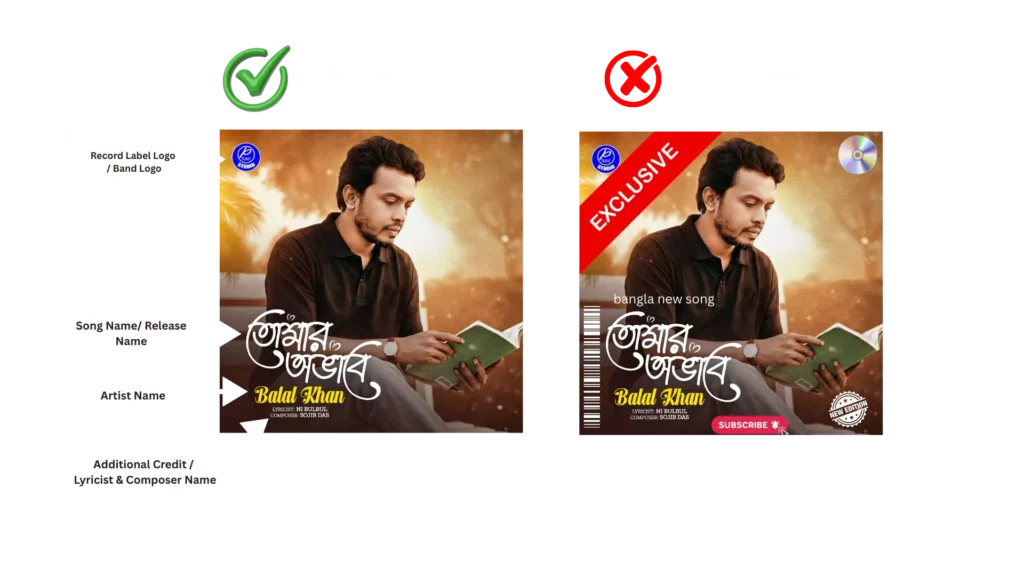
Below is the complete list of what your artwork must include, must avoid, and why the correct example in the image works — while the wrong one doesn’t.
🖼️ 1. Dimensions
Your cover must be a perfect square:
✔ 3000 x 3000 pixels
✔ 300 dpi for the best quality
This size works perfectly across all major DSPs like Spotify, Apple Music, Amazon, and YouTube Music.
🎨 2. File Format
Accepted file types:
PNG, JPG/JPEG, GIF, BMP, TIF/TIFF
Colour mode must be:
✔ RGB (Not CMYK)
CMYK causes colour distortion on digital platforms.
📁 3. File Size
✔ Under 10MB
Large files slow down processing and may get rejected.
🔍 4. Quality Requirements
Your artwork must:
- Be clear and sharp
- Not be blurry or pixelated
- Not be stretched, cropped incorrectly, or misaligned
- Look professional and retail-ready
📝 5. Allowed Text on Your Artwork
Your cover can include only:
✔ Song Name / Release Title
✔ Artist Name
✔ Optional: Lyricist & Composer Names
✔ Record Label or Band Logo (allowed)
Everything must match your exact metadata.
If there’s text on your cover, it must be accurate — no exceptions.
⚠ Generic blank artwork with no text (solid colour squares) may be rejected by many DSPs.
❌ 6. What Your Artwork MUST NOT Contain
This is where most artists make mistakes — exactly like the “Wrong Example” shown in your image.
🚫 Time-Sensitive or Promotional Text
Do NOT include:
- “Exclusive”
- “New Release”
- “Limited Edition”
- Release date
- “Bangla new song”
- Any text referring to time or urgency
🚫 Pricing or Marketing Elements
- Subscribe buttons
- Social media icons
- “Buy now”, “Click here”, “Follow us”
- Promotional stickers
🚫 Banned Logos and Brand Mentions
- Spotify / Apple Music / YouTube logos
- Website URLs
- Phone numbers
- Emails
- Social handles
- Any branding except the label or band logo
🚫 Technical Codes
- UPC
- Barcode image
- ISRC
- QR codes
🚫 Copyright Issues
- Watermarks
- Copyrighted or unlicensed photos
- Scans of old CD covers
- CD/DVD icons or physical product references
🚫 Inappropriate or Misleading Content
- Violence or harmful imagery
- Sexual or graphic content
- Images referencing an artist who is not actually in the release
- Tribute albums where the original artist’s name is bigger than the performing artist’s name
📌 Additional Rules to Keep in Mind
✔ You cannot reuse artwork from another release.
✔ Your cover must match your metadata exactly.
✔ Artwork cannot upsell another product (merch, CDs, other albums).
✔ Cover art must be fully original and not borrowed from another source.
🔍 Why the Left Image Is Correct (and the Right One Isn’t)
✔ Correct Example Contains:
- Record label logo
- Song name (Tumar Ovab)
- Artist name (Balal Khan)
- Lyricist & Composer credits
- Clean design with no violations
❌ Wrong Example Contains:
- “EXCLUSIVE” banner
- CD icon
- Subscribe button
- Barcode stripes
- Time-sensitive text
- Extra promotional graphics
These elements are strictly prohibited by all DSPs.
💬 Need Help?
If you’re unsure whether your artwork meets industry standards, feel free to send it to our support team.
We’ll review it and confirm whether it’s ready for distribution.